Output File Types: Form Server supports both PDF and .DOCX/.DOCM input and output.
Database registration: Add a row manually to the FORMS_DOCUMENTS table for every form. The FORMS_DOCUMENTS table has the following fields:
Id: int Unique primary key
Name: nvarchar(256) Name of form used as the parameter into the web application
FileName: nvarchar(256) Name of form document actually on server file system Documents folder
Prefix: nvarchar(256) Optional prefix that will be prepended on front of counter value injected into form
Count: int Running counter that is incremented when a select on the table occurs via the stored procedure FORMS_uspQueryDocuments
Form fields types in PDF is limited to PdfFormField with field name value of SerialNumber. Name any and all form fields with SerialNumber to have them filled in with Count.
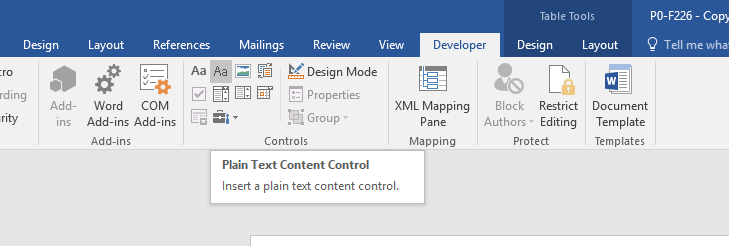
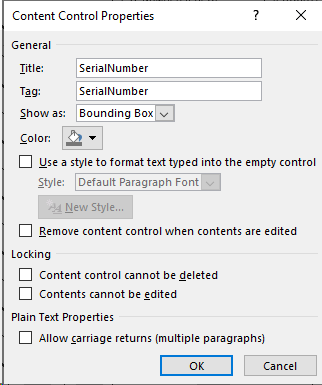
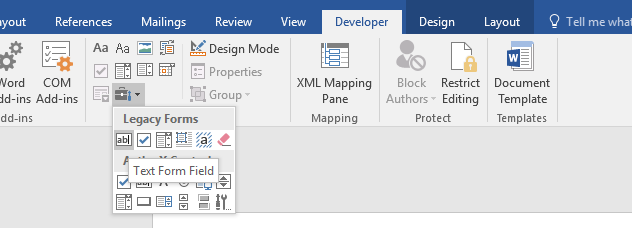
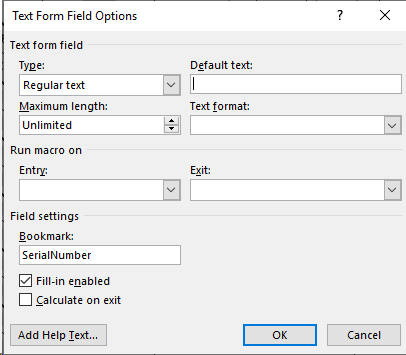
.DOCX and .DOCM formats may use either Legacy Forms Text Form Field or Plain Text Content Control under the Developer tab. Use SerialNumber for the Bookmark field for Legacy Forms and use SerialNumber in the Title field in the Plain Text Content Control properties.
ActiveX controls are not supported. Nor is it necessary to fill in the count from a client side Macro.